> ## Documentation Index
> Fetch the complete documentation index at: https://helium-mintlify-create-navigation-structure-42614.mintlify.site/llms.txt
> Use this file to discover all available pages before exploring further.
# Integrate with Your 3rd Party Analytics System
> Understanding Helium's event forwarding and analytics integration
## Overview
You can configure Helium to automatically send events to your analytics provider or webhook destination of choice.
## About Helium Events
Visit [Helium Events](/sdk/helium-events) to see the full list of events available. We're adding new events often — want support for a new event? Just ask us at [support@tryhelium.com](mailto:support@tryhelium.com)
## Automatic event forwarding (recommended)
### Configuration
Don't see your analytics provider here, or have a custom setup you want us to send events to? Reach out to [founders@tryhelium.com](mailto:founders@tryhelium.com) — we might support it under the hood.
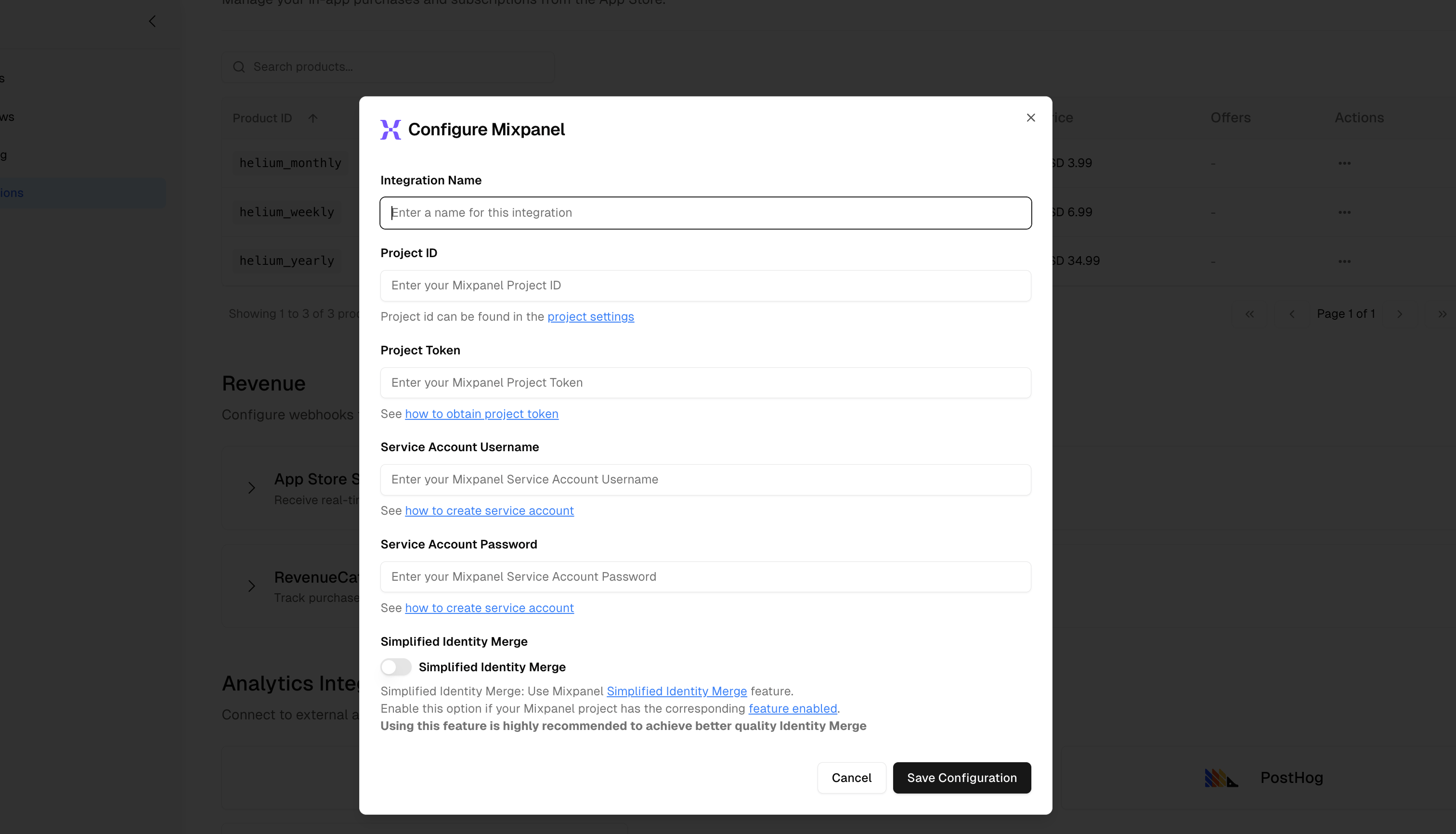 1. Go to [app.tryhelium.com/integrations](https://app.tryhelium.com/integrations). Click **Mixpanel**.
2. Give your integration a name. There are a few fields to enter due to what Mixpanel's API needs for event ingestion.
3. **Make sure that you have at least Admin or Owner level permissions in Mipxanel, for the project and service accounts**.
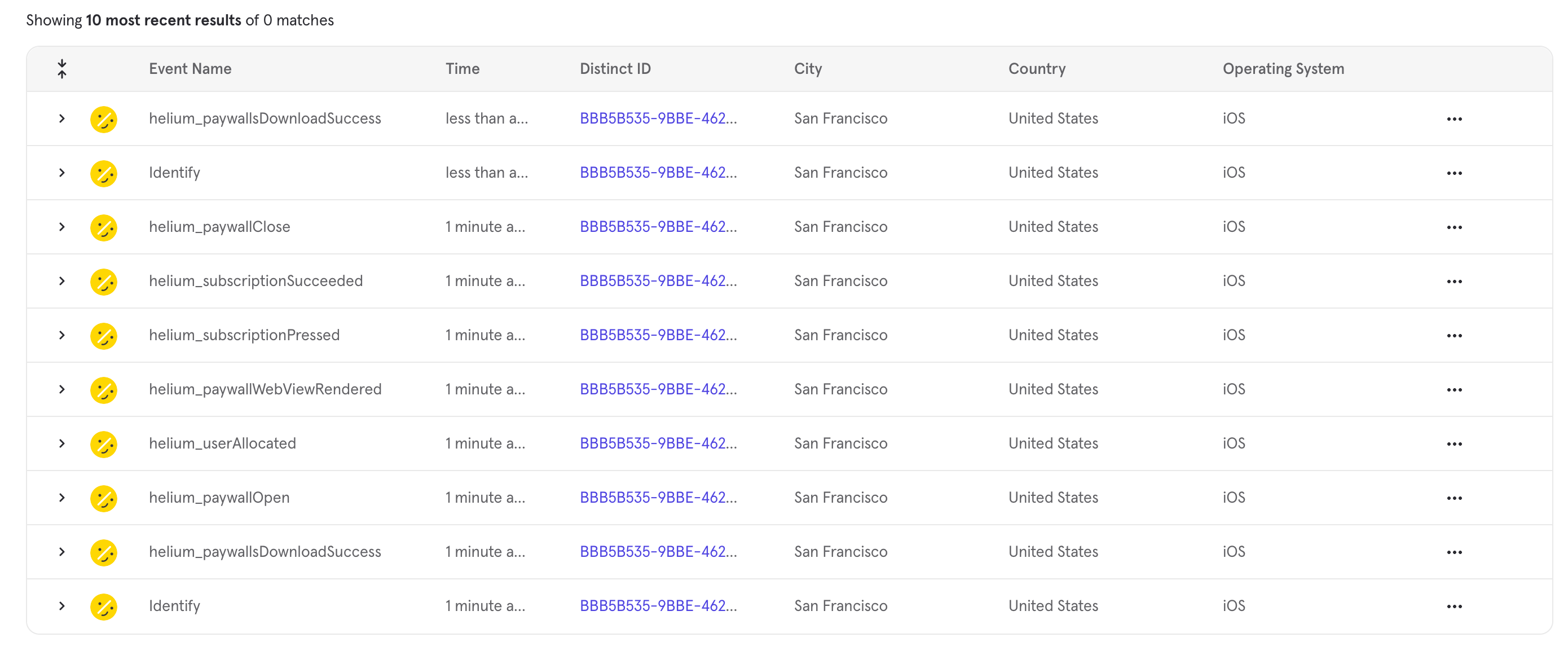
4. That's it! Paywall events (from local testing or production) will now come into Mixpanel, prefixed with `helium_`. You can view live events by going to the **Events** tab in Mixpanel
1. Go to [app.tryhelium.com/integrations](https://app.tryhelium.com/integrations). Click **Mixpanel**.
2. Give your integration a name. There are a few fields to enter due to what Mixpanel's API needs for event ingestion.
3. **Make sure that you have at least Admin or Owner level permissions in Mipxanel, for the project and service accounts**.
4. That's it! Paywall events (from local testing or production) will now come into Mixpanel, prefixed with `helium_`. You can view live events by going to the **Events** tab in Mixpanel
 ### User attribution between Helium and Mixpanel
#### Simplified Identity Merge
* Mixpanel has a way to do post/pre-login identity stitching via a few methods — with Simplified Identity Merge being the most
popular. You can read more about it by visiting [Mixpanel's docs](https://docs.mixpanel.com/docs/tracking-methods/id-management/identifying-users-simplified)
* If you'd like to use simplified identity merge, remember to set the Simplified Identity Merge method to true in the Mixpanel configuration modal.
#### Overriding the custom user id post login
* If you're using an anonymous ID pre login, and want to override it to work *post* login, you can use the `overrideUserId` method (available on all SDKs). View the relevant SDK quickstart for more info!
* In Mixpanel, Helium events will be prefixed with `helium_`.
1. Go to [app.tryhelium.com/integrations](https://app.tryhelium.com/integrations). Click **Amplitude**.
2. Give your integration a name. Enter your API key (you can find it under Settings > Projects > \[Your Project Name] and grab an API key from there).
3. That's it! Paywall events will now come into Amplitude, prefixed with `helium_`.
1. Go to [app.tryhelium.com/integrations](https://app.tryhelium.com/integrations). Click **PostHog**.
2. Give your integration a name. Enter your API key (you can find it under Settings > Projects > \[Your Project Name] and grab an API key from there).
3. That's it! Paywall events will now come into PostHog, prefixed with `helium_`.
1. Go to [app.tryhelium.com/integrations](https://app.tryhelium.com/integrations). Click **Statsig**.
2. Give your integration a name. Enter your API key (you can find it under Settings > Projects > \[Your Project Name] and grab an API key from there).
3. That's it! Paywall events will now come into Statsig, prefixed with `helium_`.
4. Watch events arrive and enjoy analytics in the Statsig UI.
Helium uses a CDP under the hood to route events. It may take several minutes for events you see on device to populate in your analytics backend.
## What events and properties are logged?
All Helium events, along with their parameters and contextual/custom traits, are automatically forwarded to your analytics backend. For a complete list of events, parameters, and additional context sent with each event, see [Logged Events](/sdk/helium-events#logged-events).
## Custom forwarding from the SDK
You can also track events from the SDK via the PaywallDelegate or lifecycle methods in each framework. View our SDK quickstarts for more information.
```swift theme={null}
// ... rest of your delegate setup ...
func onHeliumPaywallEvent(_ event: any HeliumEvent) {
if let paywallOpen = event as? PaywallOpenEvent {
// e.g., forwarding to mixpanel
Mixpanel.mainInstance().track(
event: "paywall_open",
properties: [
"trigger": paywallOpen.triggerName,
"paywall": paywallOpen.paywallName
]
)
}
// ... other event handling ...
}
```
```typescript theme={null}
// ... rest of your initialize call ...
onHeliumPaywallEvent: (event: HeliumPaywallEvent) => {
if (event.type === 'paywallOpen') {
// Forward to Mixpanel
mixpanel.track('paywall_open', {
trigger: event.triggerName,
paywall: event.paywallName
});
}
// ... other event handling ...
}
```
```dart theme={null}
// ... rest of your delegate setup ...
@override
Future onPaywallEvent(Map event) async {
if (event['type'] == 'paywallOpen') {
// Forward to Mixpanel
mixpanel.track('paywall_open', properties: {
'trigger': event['triggerName'],
'paywall': event['paywallName'],
});
}
// ... other event handling ...
}
```
```kotlin theme={null}
// ... rest of your delegate setup ...
override fun onHeliumPaywallEvent(event: HeliumEvent) {
when (event) {
is PaywallOpen -> {
// Forward to Mixpanel
mixpanel.track("paywall_open", JSONObject().apply {
put("trigger", event.triggerName)
put("paywall", event.paywallName)
})
}
// ... other event handling ...
}
}
```
### User attribution between Helium and Mixpanel
#### Simplified Identity Merge
* Mixpanel has a way to do post/pre-login identity stitching via a few methods — with Simplified Identity Merge being the most
popular. You can read more about it by visiting [Mixpanel's docs](https://docs.mixpanel.com/docs/tracking-methods/id-management/identifying-users-simplified)
* If you'd like to use simplified identity merge, remember to set the Simplified Identity Merge method to true in the Mixpanel configuration modal.
#### Overriding the custom user id post login
* If you're using an anonymous ID pre login, and want to override it to work *post* login, you can use the `overrideUserId` method (available on all SDKs). View the relevant SDK quickstart for more info!
* In Mixpanel, Helium events will be prefixed with `helium_`.
1. Go to [app.tryhelium.com/integrations](https://app.tryhelium.com/integrations). Click **Amplitude**.
2. Give your integration a name. Enter your API key (you can find it under Settings > Projects > \[Your Project Name] and grab an API key from there).
3. That's it! Paywall events will now come into Amplitude, prefixed with `helium_`.
1. Go to [app.tryhelium.com/integrations](https://app.tryhelium.com/integrations). Click **PostHog**.
2. Give your integration a name. Enter your API key (you can find it under Settings > Projects > \[Your Project Name] and grab an API key from there).
3. That's it! Paywall events will now come into PostHog, prefixed with `helium_`.
1. Go to [app.tryhelium.com/integrations](https://app.tryhelium.com/integrations). Click **Statsig**.
2. Give your integration a name. Enter your API key (you can find it under Settings > Projects > \[Your Project Name] and grab an API key from there).
3. That's it! Paywall events will now come into Statsig, prefixed with `helium_`.
4. Watch events arrive and enjoy analytics in the Statsig UI.
Helium uses a CDP under the hood to route events. It may take several minutes for events you see on device to populate in your analytics backend.
## What events and properties are logged?
All Helium events, along with their parameters and contextual/custom traits, are automatically forwarded to your analytics backend. For a complete list of events, parameters, and additional context sent with each event, see [Logged Events](/sdk/helium-events#logged-events).
## Custom forwarding from the SDK
You can also track events from the SDK via the PaywallDelegate or lifecycle methods in each framework. View our SDK quickstarts for more information.
```swift theme={null}
// ... rest of your delegate setup ...
func onHeliumPaywallEvent(_ event: any HeliumEvent) {
if let paywallOpen = event as? PaywallOpenEvent {
// e.g., forwarding to mixpanel
Mixpanel.mainInstance().track(
event: "paywall_open",
properties: [
"trigger": paywallOpen.triggerName,
"paywall": paywallOpen.paywallName
]
)
}
// ... other event handling ...
}
```
```typescript theme={null}
// ... rest of your initialize call ...
onHeliumPaywallEvent: (event: HeliumPaywallEvent) => {
if (event.type === 'paywallOpen') {
// Forward to Mixpanel
mixpanel.track('paywall_open', {
trigger: event.triggerName,
paywall: event.paywallName
});
}
// ... other event handling ...
}
```
```dart theme={null}
// ... rest of your delegate setup ...
@override
Future onPaywallEvent(Map event) async {
if (event['type'] == 'paywallOpen') {
// Forward to Mixpanel
mixpanel.track('paywall_open', properties: {
'trigger': event['triggerName'],
'paywall': event['paywallName'],
});
}
// ... other event handling ...
}
```
```kotlin theme={null}
// ... rest of your delegate setup ...
override fun onHeliumPaywallEvent(event: HeliumEvent) {
when (event) {
is PaywallOpen -> {
// Forward to Mixpanel
mixpanel.track("paywall_open", JSONObject().apply {
put("trigger", event.triggerName)
put("paywall", event.paywallName)
})
}
// ... other event handling ...
}
}
```